
Dans cette section je ne décrirais que l’installation de LLAMA sous windows, cependant vous avez le lien du site web pour d’autres installations.
https://cocktailpeanut.github.io/dalai/#/?id=windows
Windows
Step 1. Install Visual Studio
On windows, you need to install Visual Studio before installing Dalai.
Press the button below to visit the Visual Studio downloads page and download:
Download Microsoft Visual Studio
IMPORTANT!!!
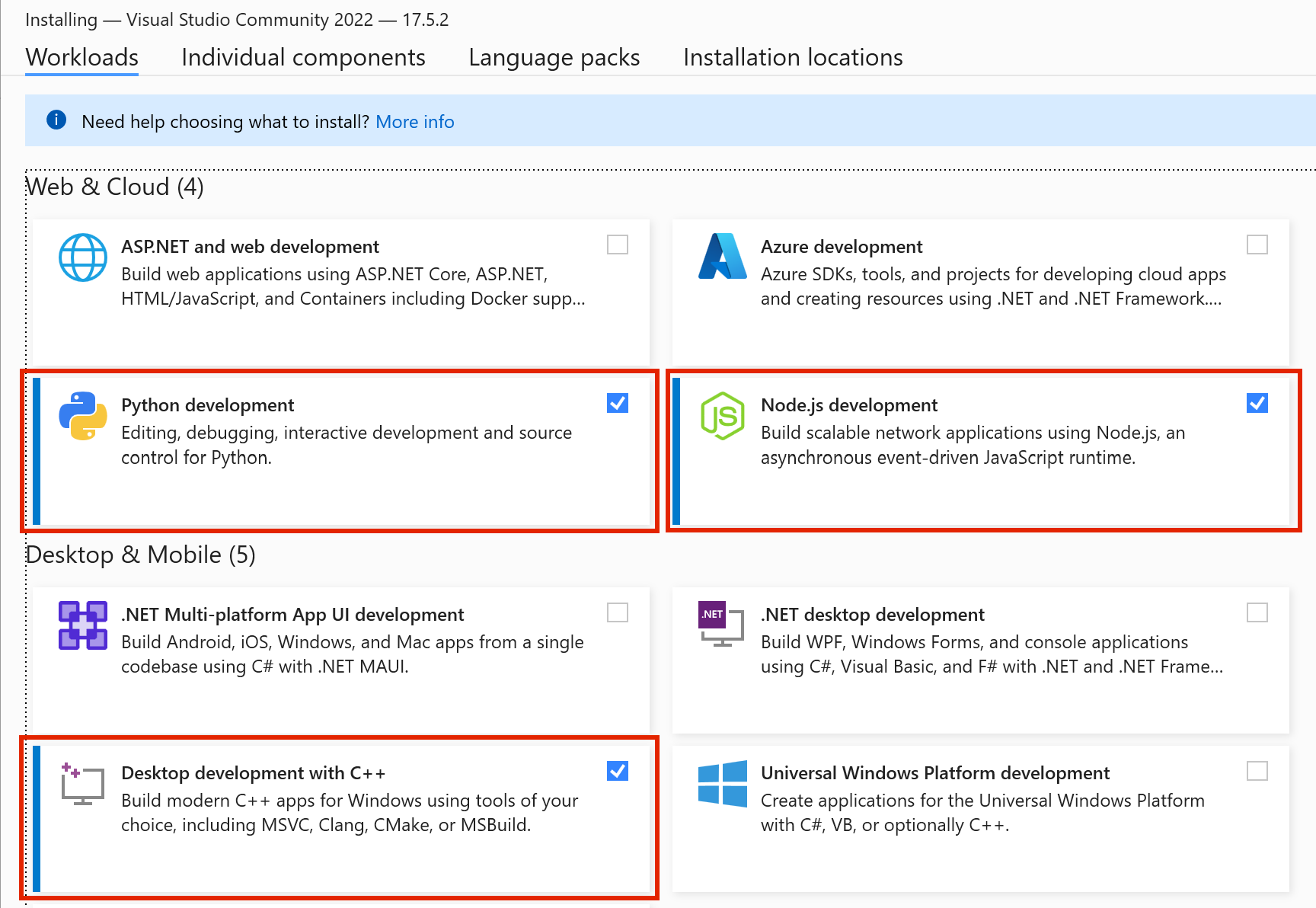
When installing Visual Studio, make sure to check the 3 options as highlighted below:
- Python development
- Node.js development
- Desktop development with C++
Step 2.1. Install models
IMPORTANT
On Windows, make sure to run all commands in cmd.
DO NOT run in powershell. Powershell has unnecessarily strict permissions and makes the script fail silently.
Currently supported engines are llama and alpaca.
Install alpaca
To download alpaca models. Open your cmd application and enter:
npx dalai alpaca install 7BAdd llama models
To download llama models. Open your cmd application and enter:
npx dalai llama install 7Bor to download multiple models:
npx dalai llama install 7B 13BStep 2.2. Troubleshoot (optional)
In case above steps fail, try installing Node.js and Python separately.
Install Python:
Install Node.js >= 18:
After both have been installed, open powershell and type python to see if the application exists. And also type node to see if the application exists as well.
Once you’ve checked that they both exist, try again.
Step 3. Run Web UI
After everything has been installed, run the following command to launch the web UI server (Make sure to run in cmd and not powershell!):
npx dalai serveand open http://localhost:3000 in your browser. Have fun!